
Before leaving the depot
We recommend running a system check before leaving the depot.
Your pre-deployment should test the following:
-
Batteries are fully charged - this can be checked on the BMS
-
Each lamp illuminates and is clean, and there are no other functional defects
- That all signals being deployed belong to the same group ID - this helps save time configuring on site
- You have the necessary keys to lock the unit
- Any moving parts are lubricated
Once you have satisfied the above you are now able to transport the signals to site.
Transporting the Evo1 signals
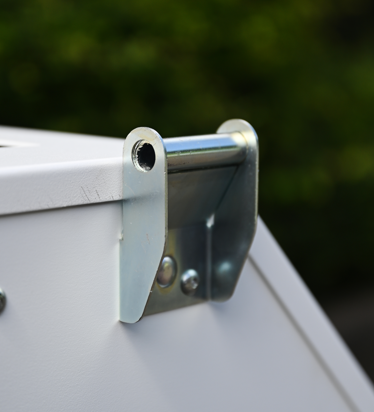
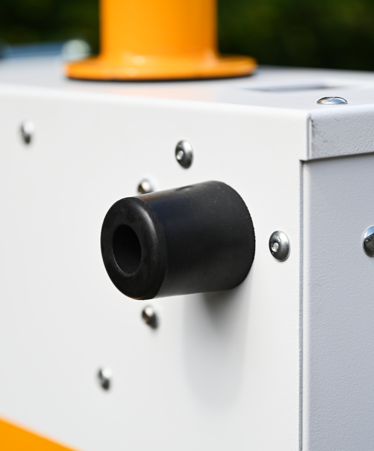
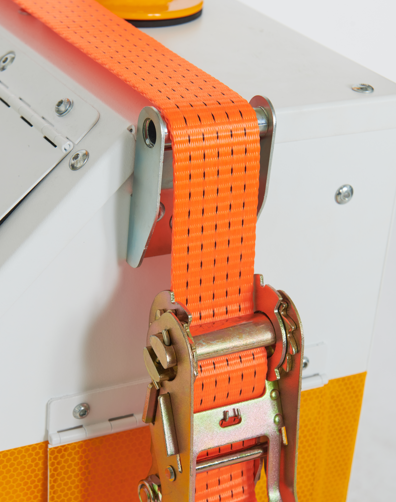
Evo1 signals feature an in-built tie-down point, which helps when securing the signals on the TM vehicle. In addition to this, there are bump guards on the front of the unit, so that they can be secured against the bulk head or facing another unit without causing damage to the signal.
 |
 |
 |
Evo1 Tie-down point |
Evo1 bump guard |
Tie-down point in use |
Use the removable handle to move the signals onto the transport vehicle and when on site, to avoid damaging the signal.
When you get to site
Before setting up your Evo1 signals, make sure you have the correct equipment for the site and an approved traffic management plan where required.
Place the signals in the correct positions for your traffic management layout.
Make sure each signal is stable, clearly visible to road users and positioned so that it does not create an unnecessary obstruction. We recommend to deploy the sliding feet to improve stabilisation and to make the units harder to move or steal.
Pedestrian equipment should also be positioned so that people can use the crossing safely.
Top tip: Set up in Lights Off mode before positioning on site
If you have the space, it saves time to unload and turn on all Evo1 signals before positioning them according to the TM plan. This will allow you to set up the system and run in Lights Off mode without having to attend each signal individually to configure when they are in position.
Setting up the system
Select which unit will be the master, we recommend this is in a central, accessible location. This will improve comms performance and make it safer to make any timing adjustments when the site is operational.
Ensure all assets belong to the same Group ID, select the operating mode (normally Smart VA) then proceed to configure the timings for each phase according to the TM plan.
Bringing the site into operation
Once you have input the correct timings, you are ready to commission the site. Press Run and the system will commence the start up cycle, with all signals starting on red, before proceeding to the first phase.
Before leaving the site, check that all signals are communicating and operating as expected. We recommend observing a number of cycles to ensure the timings are appropriate for the local traffic conditions.
Top tip: keep a record of timing configurations
We recommend that you keep a record of timing changes, along with the time and day they were made and by who. This helps inform other operatives which attend site of previous configurations and provides evidence to highways authorities that robust procedures were followed.
Site monitoring and maintenance
Once your site is live, you are responsible to ensure it remains safe and fully operational for the duration of the works. Check TMdesk daily to stay on top of battery levels, comms issues and asset position so that you are confident things are exactly how they should be. This will help you plan maintenance visits efficiently around battery swaps.
Recommended site checks:
-
Check battery levels using the BMS or master controller
-
Check comms performance using the master controller
-
Check the signal lamps are clear and free from grime
-
Check that equipment is secure and has not been tampered
-
Check that equipment has not been moved by other contractors or the general public.
- If you have pedestrian facilities, check the push button units are fully functional, along with any tactile cones.
Need more help?
For complex schemes, Traffic Group Signals Professional Services can provide additional design, deployment, commissioning and monitoring support.