What is the Assets screen?
The Assets view provides a detailed look at all of your fleet on an asset level. It can help traffic management companies understand which assets are moving, on-site, stolen and more using the powerful search and filtering capabilities.
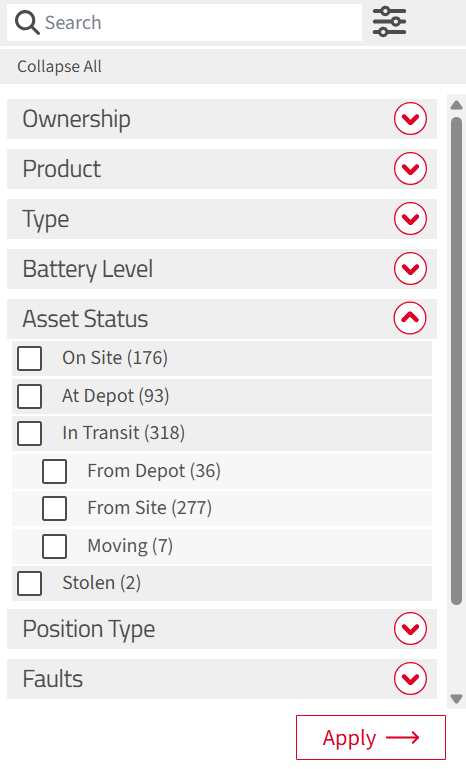
Asset Status
| Icon | Meaning | When you see it |
  |
On Site | TMdesk has associated the asset with an active signalling site. |
  |
At Depot | The latest position is within a configured depot area. |
  |
In Transit - stationary | The asset is away from a site or depot but has not recently reported movement. |
  |
In Transit - moving | The asset is away from a site or depot and has recently reported movement |
  |
Stolen | A user has marked the asset as stolen. This takes priority over its other statuses. |
Filtering
To apply a filter:
- Open Filters from the asset screen.

- Choose the criteria you want to use.
- Select Apply. Changes do not affect the list until you apply them.
- Move or zoom the map if you also want to limit the list by the area currently shown.
Asset Card
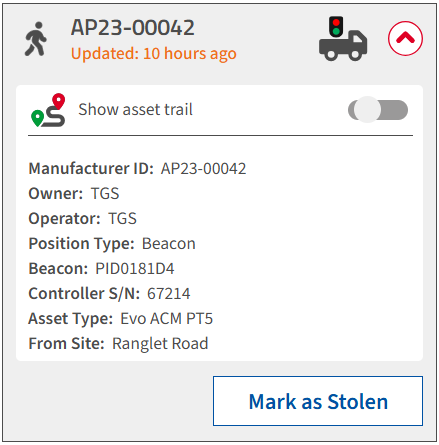
The Asset card can be expanded to show information about the asset, including the controller serial number, site location (if applicable), and type of asset.
The example below is a pedestrian signal which is in transit but stationary.
Asset Trail
The asset trail toggle displays the journey of the signal between depot and site. It can help users understand asset movements, track stolen assets and manage asset availability.

Stolen Assets
When an asset is known to be stolen, locate the asset in the Asset Detail screen and clock 'Mark as Stolen'. This notifies all your organisations users and activates the beacon alert system. The asset can then be tracked accordingly, using the asset trail and Live Feed to check stolen asset movements.
Signals that are marked as stolen will also be blocked to prevent use, using our unique LockOut feature. This will render the signal useless and can aid the recovery effort.
Traffic Group Signals does not recommend that customers or their employees attempt to recover stolen signals themselves. Do not approach or confront anyone. Report the theft and any available location information to the police, then follow their advice. Recovery should be handled by the police or a suitably qualified professional recovery service.